TL;DR
Open a free Amazon Business account
Business pricing, bulk buying and tax-exempt orders.
Create a free accountAs an affiliate, we earn on qualifying purchases.
Countdown timers are best for measuring remaining time until an event, perfect for cooking or deadlines. Count-up timers track elapsed time, ideal for workouts or tracking ongoing activities. Choosing the right mode makes your timing tasks more precise and efficient.
Timers are like the heartbeat of many daily routines, from baking bread to timing a sprint. But not all timers are created equal. Understanding the difference between a countdown and a count-up timer can save you from overcooked meals or missed workout goals. Whether you’re a home cook, a runner, or managing a project, knowing which timer mode fits your task can make all the difference.
This guide will explore when each mode shines brightest, highlighting real-world scenarios and the latest tech trends. By the end, you’ll confidently pick the right timer for every situation, making your timing more accurate and less stressful.
Choose a countdown timer when you need to finish an activity by a specific deadline, like baking or timing a sprint.
Use a count-up timer to track how long a task or activity takes, such as a workout or a long project.
Modern digital timers often combine both modes, offering flexibility and convenience in one device.
Smart timer technology has advanced, with voice control, data logging, and easy switching between modes.
Understanding which timer mode suits your task ensures more accurate timing and less stress.
Countdown vs Count-Up Timers: When Each Mode Is Useful
Countdown timers measure what remains before a deadline. Count-up timers measure what has elapsed since the start. The right choice keeps cooking, workouts, projects, experiments, and daily routines more precise with less mental load.
Modern digital timers often combine both modes in one flexible tool.
Countdowns work toward a fixed finish point.
Count-up timers reveal total elapsed duration.
Hybrid timers switch between deadline and stopwatch tasks.
Smart timers support assistants, apps, and data logging.
Two Clocks, Two Jobs
Ask one question first: do you need to finish before time runs out, or do you need to know how long something lasts? That single distinction decides most timer choices.
Use When There Is a Limit
Ideal for baking, boiling eggs, timing workout intervals, pacing a presentation, or preparing before an event starts.
Use When Duration Matters
Best for runs, work sessions, experiments, process monitoring, project logs, and any task where the finish time is unknown.
Use When Context Changes
Smartphone apps and modern digital timers can switch modes, store laps, log results, and support voice control.
How to Pick the Right Mode
Move through the task from goal to feedback. The moment you know whether the clock is protecting a deadline or measuring effort, the mode becomes obvious.
Name the Task
Cooking, training, working, presenting, testing, or waiting.
Find the Finish
If the end time is fixed, choose countdown.
Measure Effort
If the end is open, choose count-up.
Add Features
Use alarms, laps, intervals, or app sync where useful.
Review Results
Logged time helps improve routines and repeat tasks.
Countdown vs Count-Up in Daily Use
Both modes are useful, but they answer different questions. Countdown asks, “How much time is left?” Count-up asks, “How long has this been going?”
| Scenario | Countdown | Count-Up | Best Mode | Why It Works |
|---|---|---|---|---|
| Cooking or baking | ✓ Strong fit | ✗ Weak fit | Countdown | You need an alert when food should be checked or removed. |
| Workout duration | ~ Sometimes | ✓ Strong fit | Count-Up | Tracks how long you have been exercising or recovering. |
| Presentation pacing | ✓ Strong fit | ~ Sometimes | Countdown | Keeps you inside a fixed time slot before the session ends. |
| Project or process logging | ✗ Weak fit | ✓ Strong fit | Count-Up | Measures total elapsed time for analysis and progress tracking. |
| Scheduled event prep | ✓ Strong fit | ✗ Weak fit | Countdown | Shows remaining time before the event starts. |
What Modern Timers Add
Digital and app-based timers increasingly bundle accuracy, customization, mode switching, voice commands, and logs into one interface.
Feature Momentum
Hybrid mode support is the anchor feature, but modern timers are becoming broader productivity tools.
Fast Answers Before You Set the Clock
The practical split is simple: countdown protects a deadline; count-up records elapsed time. Hybrid devices cover both without needing separate tools.
Which mode is better for cooking?
Countdown is usually best because it gives a clear alert when food should be checked, stirred, removed, or rested.
Can a countdown timer act like a stopwatch?
Not directly. A countdown runs from a set time to zero, while a stopwatch starts at zero and counts upward.
Are there timers that do both?
Yes. Many digital timers and smartphone apps support countdown and count-up modes, often with quick switching.
Why choose digital over mechanical?
Digital timers usually offer higher accuracy, easier setting, multiple alarms, interval options, and data logging.
The Simple Rule
Use countdown when you are moving toward a finish line. Use count-up when you are measuring how long the run lasts. Modern dual-mode timers make the switch easy, so the real win is matching the mode to the job before you press start.
What exactly is a countdown timer—and when should you use one?
A countdown timer counts down from a set time to zero, alerting you when time’s up. Imagine baking a batch of cookies: you set the timer for 15 minutes, and once it hits zero, a chime rings out, telling you to check on your treats. They’re perfect whenever you need to stay within a specific limit.
Use a countdown when you’re timing an event that starts now and ends at a precise moment—like boiling eggs, timing a workout interval, or managing a presentation. They keep you aware of how much time remains, so you don’t miss your window.
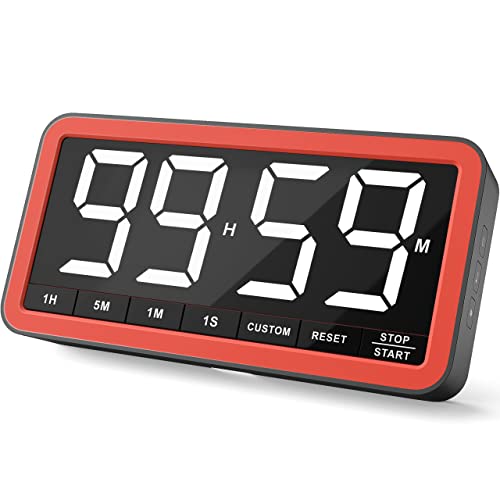
VOCOO Large 7.8" Digital Timer, Magnetic LED Timer for Kitchen & Classroom
- Large 7.8-inch Display: Clear visibility with 2.3-inch tall numbers
- Adjustable Brightness Levels: 3 brightness settings for any environment
- Silent and Audible Alerts: Quiet mode and customizable alarms
As an affiliate, we earn on qualifying purchases.
As an affiliate, we earn on qualifying purchases.
What is a count-up timer—and when should you rely on it?
A count-up timer, often called a stopwatch, starts at zero and tracks how long an activity lasts. Think of a runner starting a race: they press start at the gunshot, and the timer records every second they push forward. It’s all about measuring duration, not remaining time.
Use a count-up when you want to know exactly how long something takes—like tracking your workout, timing a presentation, or monitoring how long a process has been running. It’s the perfect tool for measuring ongoing effort.
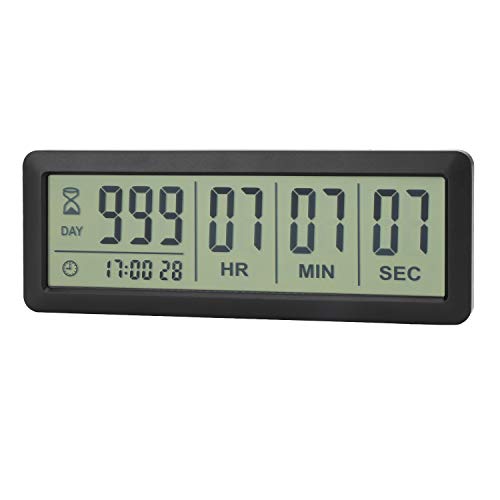
A AIMILAR 999 Days Countdown Timer Digital Clock Retirement Vacation Event Day Counter with Count Up Function
- Countdown Duration: Counts up to 999 days, 23 hours, 59 minutes, 59 seconds
- Event Types: Ideal for retirement, vacations, weddings, and more
- Alert Notification: 60-second alert when countdown ends
As an affiliate, we earn on qualifying purchases.
As an affiliate, we earn on qualifying purchases.
Countdown vs Count-Up: Which Timer Mode Fits Your Tasks?
Imagine you’re cooking dinner with friends. You set a countdown timer for 20 minutes to remind everyone when the main course is ready. On the other hand, if you’re tracking how long it takes to write a report, a count-up timer is your best friend—starting at zero and running until you finish.
Here’s a quick comparison to help you decide:
| Scenario | Best Timer Mode | Why |
|---|---|---|
| Cooking or baking | Countdown | You need to know when to check or remove food. |
| Workout or exercise | Count-up | Tracks how long you’ve been sweating it out. |
| Tracking ongoing process (like a project) | Count-up | Measures total elapsed time for progress. |
| Preparing for an event | Countdown | Ensures you’re ready before the clock runs out. |

myTouchSmart In-Wall Digital Timer, 4 Programmable On/Off Buttons, 2 Easy On/Off Buttons, 24 Hour Daily Cycles, Blue LED Indicators, with Battery Backup, for Indoor/Outdoor Lights, Fans, 26893
- Scheduling for Lights and Appliances: Save time, money, and energy
- Programmable and Override Buttons: 4 programmable and 2 override buttons
- LED Indicator Lights: Blue LEDs show active programs
As an affiliate, we earn on qualifying purchases.
As an affiliate, we earn on qualifying purchases.
The Latest in Timer Tech: What’s New and Exciting?
Modern timers aren’t just simple devices anymore. Smart timers now connect to your phone or voice assistants, letting you start, stop, or switch modes remotely. Imagine telling your smart speaker, “Start a 10-minute countdown,” from your cozy couch.
Hybrid timers that toggle between countdown and count-up modes are gaining popularity. They give you flexibility—use countdown for deadlines, switch to count-up to track ongoing efforts.
Plus, many now log data—saving elapsed or remaining time for later review. This is especially handy for research, productivity analysis, or monitoring long-term projects.
These advancements make timing more seamless, intuitive, and adaptable for every part of your life.

TPNEG Digital Kitchen Timer – 4-Channel Cooking Timer with Alarm, Magnetic Back, Loud & Silent Modes, Count Up/Down, Ideal for ovens, Seniors, Kids and classrooms, Replaceable AAA Battery
- Easy to Use: Intuitive design with quick preset setup
- 4-Channel Timing: Simultaneously time four events with precision
- Long Battery Life: Operates over three months on two AAA batteries
As an affiliate, we earn on qualifying purchases.
As an affiliate, we earn on qualifying purchases.
Did you know? The key fact about modern timers
Modern digital timers with both countdown and count-up features are now widely available, providing versatile tools that adapt to different needs. Unlike traditional single-mode timers, these devices can switch modes instantly, saving space and offering more functionality in one device. According to Timer Tools, this dual-mode capability is a game-changer for home cooks, athletes, and busy professionals.
Your most common questions answered
Q1: Which timer mode is better for cooking? A countdown timer is usually best, giving you a clear alert when your food is ready. It’s like having a personal kitchen assistant whispering, “Check now!”
Q2: Can I use a countdown timer as a stopwatch? Not exactly. Countdown timers count down from a set time, while stopwatches (count-up timers) measure how long something lasts. Some digital timers can switch modes, but they’re not interchangeable without changing settings.
Q3: Are there timers that do both? Absolutely. Many modern digital timers and smartphone apps support both countdown and count-up modes, making them versatile for any timing task.
Q4: Why choose digital over mechanical? Digital timers offer higher accuracy, multiple functions, alarms, and data logging, making them more adaptable for different needs.
Q5: How do I pick the right timer? Think about your main use—timing an event or measuring duration—and choose a device that matches those needs with the right features.
Conclusion
Knowing when to use countdown versus count-up timers makes your routines smoother and more precise. It’s about matching the tool to the task—whether you’re aiming for a perfect loaf or timing how long you’ve been at it.
Next time you set a timer, ask yourself: am I counting down to a finish line or measuring how long I’ve been running? That small shift in thinking can make your timing more effective—and your day a lot easier.
Back to school Picks
back to school
As an affiliate, we earn on qualifying purchases.