TL;DR

Get kitchen gear delivered free with Prime
- Fast, free delivery on millions of items
- Prime Video, Amazon Music and more included
- Member-only deals all year
Big buttons and large displays in kitchen timers greatly improve ease of use and accessibility, especially for seniors and those with limited dexterity. Modern timers incorporate smart tech, tactile feedback, and inclusive design to make cooking safer and more convenient.
Ever struggled to read tiny numbers or press small buttons on your kitchen timer? You’re not alone. Many home cooks find that simple ergonomic features—big buttons, large displays—make all the difference in everyday use. These thoughtful design choices aren’t just about comfort; they boost safety, speed, and confidence in the kitchen.
In this guide, you’ll learn how ergonomic features transform a basic timer into a truly accessible kitchen gadget. Whether you’re cooking with arthritis, caring for an aging parent, or just tired of fumbling with tiny controls, understanding these features helps you pick timers that are easier, safer, and more fun to use.
Big buttons should be at least 1 inch wide and tactile for easy pressing, especially with damp or shaky hands.
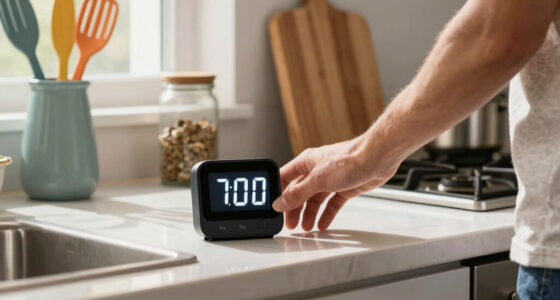
Large, high-contrast displays—over 2 inches tall—make reading the timer from across the kitchen effortless.
Timers with multiple alert options (sound, vibration, visual) cater to a wider range of abilities and environments.
Design features like textured surfaces, non-slip bases, and durable materials improve safety and comfort during use.
Modern ergonomic timers combine big buttons, large displays, and accessibility tech for a safer, more inclusive kitchen.
Why Big Buttons Make Your Timer Easier to Use
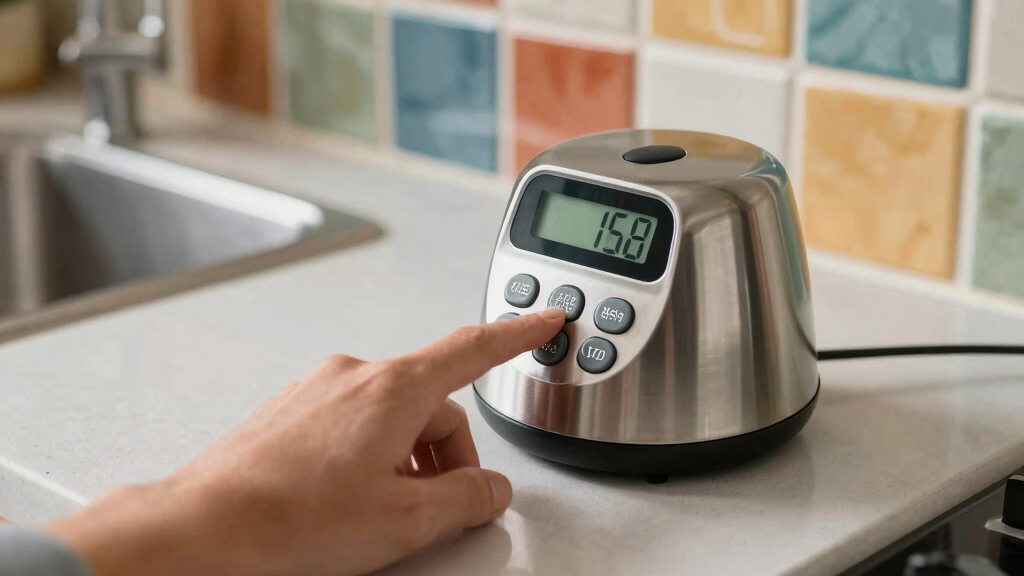
Big, clearly labeled buttons reduce the effort needed to set or reset your timer. Imagine pressing a button the size of a silver dollar rather than a tiny coin—less strain, fewer mistakes. This is especially important for users with limited dexterity or arthritis, where fine motor control is compromised. Large buttons minimize the risk of pressing the wrong function, which can lead to cooking errors or delays. Additionally, tactile, oversized buttons provide immediate physical feedback, confirming that the correct control has been activated without requiring visual confirmation. This reduces cognitive load and enhances confidence, particularly in high-stress cooking situations. For example, a senior with arthritis told me she loves her timer with oversized, tactile buttons; she can set it quickly without pain or frustration.
According to Timer Tools, large buttons also minimize accidental presses—an important factor when multitasking or handling greasy, wet hands. By making controls more forgiving and intuitive, ergonomic design helps prevent mishaps that could spoil a dish or cause safety hazards. When choosing timers, look for models with at least 1-inch-wide buttons, tactile surfaces that can be distinguished by touch alone, and separate start/stop controls to streamline operation and reduce confusion.
As an affiliate, we earn on qualifying purchases.
How Large, High-Contrast Displays Help You Read from a Distance
A large, high-contrast display isn’t just about aesthetics; it has a direct impact on safety and efficiency in the kitchen. When the display is easy to read from across the room, it reduces the need for closer inspection, which can be disruptive and time-consuming. This is especially critical when multitasking or managing multiple dishes. For example, a timer with a 2-inch tall digital readout allows you to glance at the remaining time without stopping your workflow, helping you stay alert and avoid overcooking. High-contrast colors, such as white numerals on a black background, significantly improve visibility in various lighting conditions, including dimly lit kitchens or during nighttime cooking. The bold, simple font choices further eliminate confusion, making it easier to interpret the remaining time at a glance. When selecting a timer, consider these factors as they directly influence how quickly and accurately you can respond to the timer’s cues. Failing to prioritize readability can lead to missed alarms or overcooked food, which impacts safety and meal quality.
Furthermore, larger displays with clear contrast reduce eye strain, a common issue during prolonged cooking sessions. They also help users with visual impairments or age-related vision decline to maintain independence in the kitchen. The tradeoff, however, might be increased size and potentially higher cost, but the gains in safety and usability often outweigh these considerations. Features like bold numerals, adjustable brightness, and minimal clutter in the interface enhance overall effectiveness, making the timer a more reliable tool in everyday cooking scenarios.
ergonomic kitchen timer with big buttons
As an affiliate, we earn on qualifying purchases.
As an affiliate, we earn on qualifying purchases.
Accessibility Features That Make Timers Truly Inclusive
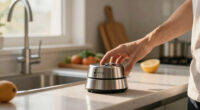
Accessibility isn’t just a buzzword. It means your timer can be used comfortably by everyone, regardless of ability. Features like tactile buttons, loud alarms, and visual cues turn a standard gadget into an inclusive tool. For instance, a timer with vibration alerts helped a hearing-impaired chef stay on schedule without missing signals. These features are essential because they address different sensory modalities, ensuring that users with various disabilities can operate the timer effectively. For example, tactile buttons with textured surfaces provide physical cues for users with visual impairments, allowing them to confirm settings through touch alone. Loud alarms, which can be adjusted for volume, ensure that users with hearing difficulties are alerted promptly. Visual cues like blinking lights or color-coded signals offer additional layers of notification, especially useful in noisy or busy environments. Smart timers with voice control enable hands-free operation, which is crucial for users with mobility challenges or when hands are occupied with other tasks. The key is to combine multiple signals—auditory, visual, tactile—to create a truly inclusive experience, reducing the risk of missed alerts and ensuring safety for all users.
Choosing timers with these features means recognizing the importance of universal design principles. It’s about eliminating barriers and making the kitchen a safer, more accessible space. When designing or selecting these products, consider the variety of needs in your household or workplace. The investment in inclusive features not only enhances safety but also promotes independence and confidence, empowering users of all abilities to cook and manage their time effectively.
accessible digital timer for seniors
As an affiliate, we earn on qualifying purchases.
As an affiliate, we earn on qualifying purchases.
Frequently Asked Questions
Large buttons and displays improve usability for people with visual impairments, arthritis, or limited dexterity. They make setting and reading timers quick, easy, and less frustrating.
What features should I look for in an accessible kitchen timer?
Prioritize tactile buttons, loud or adjustable alarms, high-contrast large displays, and compatibility with assistive devices like voice control or vibrations.Are smart timers with voice control better than traditional ones?
They offer hands-free operation and are especially useful for users with mobility challenges. However, they tend to be more expensive and require a smart home setup.How do I choose a kitchen timer suitable for elderly or disabled users?
Focus on large, easy-to-press buttons, clear high-contrast displays, loud or vibrating alerts, and voice control capabilities if possible.What are some recommended ergonomic kitchen timers?
Look for brands like OXO, Etekcity, and Hamilton Beach, which offer models with big, tactile buttons, large displays, and accessibility features tailored for diverse needs.As an affiliate, we earn on qualifying purchases.
Conclusion
Choosing a kitchen timer isn’t just about accuracy. It’s about safety, comfort, and making your kitchen accessible for everyone. When you pick models with big buttons, large displays, and inclusive features, you’re investing in peace of mind and confidence every time you cook.
Remember: a well-designed timer is a simple upgrade that transforms your space into a safer, more welcoming place for all cooks—no matter their age or ability. So, next time you shop, look for those ergonomic features. Your kitchen—and your hands—will thank you.
Fall Picks
fall essentials
As an affiliate, we earn on qualifying purchases.