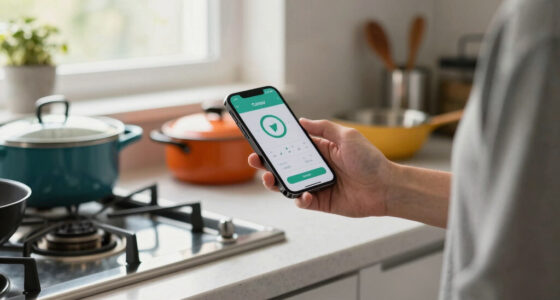
Use this guide to take an accurate food temperature with a digital kitchen thermometer, decide whether the food is cooked to a safe temperature, and clean the probe before storing it. It is for home cooks who are new to probe thermometers or want a reliable routine. Allow about 5-10 minutes for a check, including cleaning; cooking time varies by food.

Get kitchen gear delivered free with Prime
- Fast, free delivery on millions of items
- Prime Video, Amazon Music and more included
- Member-only deals all year
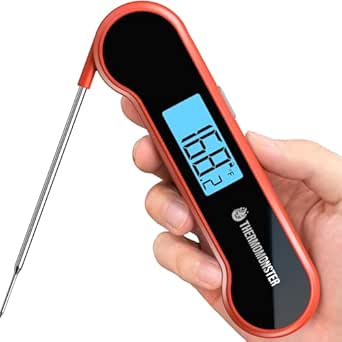
ThermoMonster Instant-Read Meat Thermometer, 0.5-Second, Red
- ✔ Temperature range: Up to 572°F; lower limit not specified
- ✔ Response time: 0.5 seconds
- ✔ Accuracy / resolution: NIST-certified ±0.5°F as described

Digital Meat Thermometer – 1‑2 sec Instant Read, Stocking Stuffer
- ✔ Temperature range: -58°F to 572°F (-50°C to 300°C)
- ✔ Accuracy: ±1°F
- ✔ Response time: 1–2 seconds

Alpha Grillers Digital Meat Thermometer
- ✔ Temperature range: 1°F to 300°F as listed
- ✔ Response time: 1–2 seconds
- ✔ Display: Blue backlit digital display
Difficulty: Beginner | Time: 5-10 minutes per temperature check
What You’ll Need
Tools & Materials:
- A clean digital kitchen thermometer with a probe
- Soap and clean water, or food-safe sanitizing wipes
- A clean towel or paper towel
Knowledge:
- Basic familiarity with the thermometer’s power button and display
- The recommended safe temperature for the food being cooked
Check the thermometer’s manual for its temperature range, water resistance, and any specific cleaning instructions. Keep the food on a clean plate or cooking surface, and use a fresh clean plate for cooked food rather than one that held raw meat.
ThermoMonster Instant-Read Meat Thermometer, 0.5-Second, Red
When quick repeat checks matter, ThermoMonster’s stated 0.5-second response gives it a clear advantage over the two models rated at one to two seconds. It also claims ±0.5°F accuracy, tighter than the ±1°F listed for the red Digital Meat Thermometer. That combination makes this the strongest fit for cooks who want fast, fine-grained readings while checking multiple portions or monitoring a quick-moving cook.The auto-flip LCD is designed to remain easy to read as the thermometer changes orientation, and the product description says it is bright enough for night use. Its 4-inch stainless steel probe and temperature-lock feature add useful handling details. The probe can keep hands farther from hot food than a short stubby design, but it may still be short for very large roasts compared with longer-probe options.Against the red 1–2 second model, ThermoMonster offers faster stated readings and tighter stated accuracy, while giving up that model’s listed 4000+ hour battery-life claim and magnetic storage. Alpha Grillers also has a backlit display and waterproofing, but its listed temperature ceiling is much lower. ThermoMonster is described as waterproof, though no specific IP rating is provided. Its plastic housing and replaceable AAA battery are practical compromises, and it has no stated wireless monitoring.
Pros:
- Stated 0.5-second response time and ±0.5°F accuracy
- Large auto-flip LCD designed for easy reading, including at night
- Four-inch stainless steel probe with temperature lock
- Waterproof design for easier cleanup
Cons:
- Four-inch probe may be short for very large roasts
- Uses a replaceable AAA battery
- Plastic housing may feel less substantial than metal models
Best for: Cooks who prioritize quick repeat readings, tight stated accuracy, and a readable display for grilling or indoor cooking.
Not ideal for: Anyone who needs a longer probe for very large roasts, remote monitoring, a metal-bodied feel, or a stated IP67 rating.
Bottom line: We recommend ThermoMonster for cooks who value the fastest stated readings and tightest stated accuracy in this comparison.
“We recommend ThermoMonster for cooks who value the fastest stated readings and tightest stated accuracy in this comparison.”
Digital Meat Thermometer – 1‑2 sec Instant Read, Stocking Stuffer
This model makes the most sense when one thermometer needs to cover more than meat doneness. Its stated -58°F to 572°F range spans cold and high-temperature readings, and the description names grilling, smoking, and baking among its uses. Compared with Alpha Grillers, whose listed maximum is 300°F, this range leaves more headroom for hotter cooking tasks. ThermoMonster also reaches a stated 572°F maximum, but the red model provides the clearest lower bound in its supplied specifications.The 1–2 second response and ±1°F accuracy should suit routine checks, although ThermoMonster is the sharper choice when speed and precision are the top priorities. A bright backlit display helps in dim kitchens and outdoor settings, while the magnetic storage feature gives this model a convenient home on a metal surface. The 6.5-inch length is compact enough for a drawer, though the supplied specs do not separately state probe length.Its IP67 rating and 4000+ hour battery-life claim are useful for cooks who want easy cleanup and fewer battery changes. Those figures distinguish it from Alpha Grillers, which also lists IP67 but requires a CR2032 replacement over time, and from ThermoMonster, which uses a AAA battery and does not specify a waterproof rating. The tradeoff is a simpler feature set: there is no built-in temperature alarm or Bluetooth, so it is a manual-check tool rather than a monitor you can follow from across the room.
Pros:
- Broad stated range from -58°F to 572°F
- IP67 waterproof rating and bright backlit LCD
- Magnetic storage and auto-sleep feature
- Claimed battery life of more than 4000 hours
Cons:
- No built-in temperature alarm
- No Bluetooth connectivity
- Stated ±1°F accuracy is less precise than ThermoMonster’s claim
Best for: Home cooks who want a wide stated temperature range, a backlit display, and magnetic storage for frequent kitchen or grill use.
Not ideal for: Cooks who want the fastest stated response, Bluetooth monitoring, or a built-in temperature alarm.
Bottom line: We favor this model for broad temperature coverage and convenient storage, provided manual readings meet your needs.
“We favor this model for broad temperature coverage and convenient storage, provided manual readings meet your needs.”
Alpha Grillers Digital Meat Thermometer
Alpha Grillers is aimed at cooks who want a simple instant-read tool for familiar kitchen jobs. Its description covers meat, liquids, deep frying, and candy making, alongside grills, ovens, air fryers, and smokers. The one-to-two-second response is in the same general class as the red Digital Meat Thermometer, and the blue backlit display is useful when the cooking area is poorly lit.The biggest decision point is its listed 300°F upper temperature limit. That may be enough for many routine checks, but it falls well below the 572°F upper limit listed for both ThermoMonster and the red model. Buyers who want greater headroom across high-temperature tasks should favor one of those options. The supplied specifications also give a lower limit of 1°F, so this listing does not describe the same below-freezing coverage as the red model.Alpha Grillers does include an IP67 waterproof rating, which makes cleanup more straightforward, and it arrives pre-calibrated according to the description. Its 6.3-inch length and 2.4-ounce weight make it a compact option to keep close at hand. The plastic housing is less premium in feel than some metal-bodied alternatives, and its CR2032 battery will need replacement. ThermoMonster is faster and more precise by its stated figures; the red model provides a broader range and magnetic storage. Alpha Grillers earns its place for accessible, everyday tasks rather than maximum range or precision.
Pros:
- One-to-two-second response for routine checks
- IP67 waterproof rating
- Blue backlit display for low-light cooking
- Described as pre-calibrated and usable across several common cooking tasks
Cons:
- Listed maximum temperature of 300°F is lower than the other two models
- Requires a CR2032 battery replacement over time
- Plastic housing may feel less premium
Best for: Cooks who mostly check everyday meat and food temperatures and value a compact, backlit, waterproof thermometer.
Not ideal for: Anyone who needs readings above the listed 300°F ceiling, below 1°F, or the tightest stated accuracy in this lineup.
Bottom line: We suggest Alpha Grillers for straightforward everyday checks, but its listed temperature ceiling makes it the least flexible choice here.
“We suggest Alpha Grillers for straightforward everyday checks, but its listed temperature ceiling makes it the least flexible choice here.”
As an Amazon Associate we earn from qualifying purchases.
Before You Start
Find the safe minimum temperature for the food before cooking. Use a trusted food-safety source for your country and food type. For example, U.S. USDA guidance lists 165°F (74°C) for poultry, 160°F (71°C) for ground meats, and 145°F (63°C) followed by a three-minute rest for whole cuts of beef, pork, lamb, and veal. Local guidance may differ. Do not rely on color, cooking time, or juices alone to determine doneness.
Check whether your thermometer is an instant-read model or an oven-safe probe. Most instant-read thermometers are designed for brief checks and should not stay in the oven. Follow the manufacturer’s instructions, and keep the display and electronics away from heat and water unless the model is rated for exposure.
Step-by-Step Instructions
Step 1: Check the thermometer
Read the thermometer instructions, then inspect the probe and display for damage or residue. Turn the thermometer on and confirm that the screen shows a readable temperature. If the model has a calibration or accuracy check, follow the manual’s procedure before use.
Tip: Do not use a thermometer with a cracked probe, a loose display, or a damaged cable. Replace it or contact the manufacturer.
Check: The thermometer powers on, displays a stable reading, and has a clean, undamaged probe.
Step 2: Choose the thickest part of the food
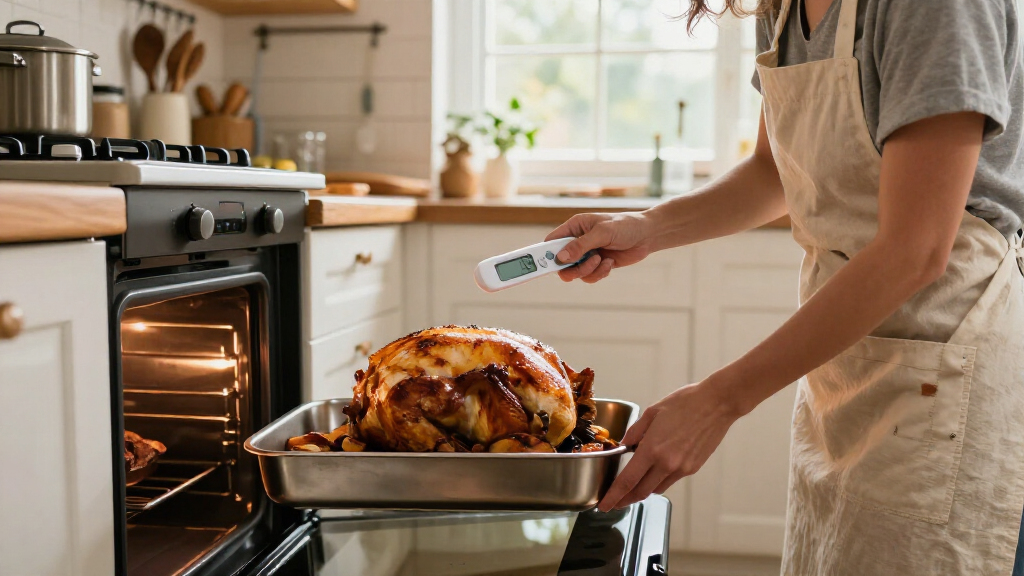
Identify the thickest portion of the food, since it usually heats more slowly than the surface. For a thin burger, chop, or fillet, choose a spot where the probe can enter from the side and reach the center. For a roast, find the thickest area away from bone and large pockets of fat.
Tip: Bone can heat differently from surrounding meat and may give a misleading reading if the probe touches it.
Check: You have picked a central spot that can be reached without touching bone, the pan, or a cavity.
Step 3: Insert the probe correctly
Insert the probe into the food according to its design. Push it far enough for the thermometer’s sensing area to sit in the center of the thickest portion; check the manual to find the sensing area if it is not marked. For thin foods, insert the probe sideways so the sensing area is fully inside the food.
Keep the probe away from the cooking pan, grill grate, bone, and any cavity. These surfaces can produce readings that do not represent the food’s center.
Tip: Do not assume the probe tip alone measures the temperature. On some models, the sensing area extends along part of the probe.
Check: The sensing area is surrounded by food, with the probe clear of bone and hot cookware.
Step 4: Wait for a steady reading
Hold the probe in place and wait until the displayed temperature stops changing. Follow the thermometer’s manual for its response time; many digital models settle within a few seconds. Avoid moving the probe while the reading is stabilizing.
Tip: If the reading keeps changing, leave the probe in place a little longer. A fast initial number may not be the final temperature.
Check: The display holds a steady temperature rather than continuing to rise or fall.
Step 5: Check more than one location
Record or remember the reading, then check another thick area of the food, especially when cooking a large roast, a whole bird, or several pieces together. Insert the probe into each area separately and wait for each reading to settle. Use the lowest reading to judge whether the food has reached its safe temperature.
Tip: Pieces of different sizes can finish at different times. Check the largest pieces and any area that may heat slowly.
Check: You have checked the relevant thick areas, and each reading meets the safe temperature for that food.
Step 6: Continue cooking if needed
Continue cooking the food if any reading is below the recommended safe temperature. Remove and set aside pieces that have reached their safe temperature if doing so is practical, then recheck the cooler area after more cooking. For foods that need a rest period at a specified temperature, follow the food-safety guidance for the full rest time.
Tip: Do not treat a short rest as a substitute for reaching the specified temperature unless the guidance for that food explicitly calls for a rest period.
Check: The lowest relevant reading has reached the recommended target, and any required rest period is complete.
Step 7: Clean the probe after checking
Turn the thermometer off if its instructions call for it. Wash the probe with hot, soapy water, or use a food-safe sanitizing method permitted by the manufacturer. Rinse if required by the cleaning product, then dry the probe with a clean towel or let it air-dry.
Clean the probe between checking raw and cooked foods to prevent cross-contamination. Do not submerge the display, cable, or electronics unless the thermometer is rated for it.
Tip: A wipe alone may not clean visible residue from the probe. Wash off food debris before sanitizing.
Check: The probe is visibly clean and dry, with no food residue left on it.
Step 8: Store the thermometer safely
Put the dry thermometer in its protective case or a clean drawer, keeping the probe away from utensils that could bend or damage it. Store it according to the manual, and replace the probe cover if the model includes one.
Tip: Keep the thermometer out of hot cookware and away from children when the probe is exposed.
Check: The thermometer is clean, dry, protected, and ready for the next use.
Common Mistakes to Avoid
- Taking a reading near the surface or in a thin part of the food. — Place the sensing area in the thickest part, and insert sideways into thin foods so it reaches the center.
- Touching bone, the pan, or grill grate with the probe. — Choose a clear path into the food and reposition the probe if it contacts a hard surface.
- Removing the probe as soon as a number appears. — Hold it still until the reading settles, then check other thick areas when needed.
- Using the same unwashed probe on raw and cooked food. — Wash and sanitize the probe between checks, especially when moving from raw food to cooked food.
Troubleshooting
Problem: The display stays blank or turns off.
Solution: Check the power button and battery, following the manual for replacement. If the screen still does not work, do not rely on the thermometer for a safety decision; use a working thermometer.
Problem: The reading changes continuously.
Solution: Hold the probe still and give it more time to settle. Confirm the sensing area is fully inside the food and not touching bone or cookware.
Problem: The reading seems unexpectedly high or low.
Solution: Reposition the probe in the center of the thickest portion and take another reading. Check a second spot, and consult the manual’s accuracy or calibration instructions if results remain inconsistent.
Problem: The food is below its safe temperature after cooking.
Solution: Return it to the heat and cook it longer, then check the cooler areas again. Clean the probe between checks if it touched raw food.
What Success Looks Like
The food’s thickest and slowest-heating areas have reached the recommended safe temperature, measured with the thermometer’s sensing area fully inside the food and away from bone and cookware. Any required rest period is complete. The probe is clean and dry before storage.
Next Steps
Store the thermometer where its probe will not bend or become contaminated. Replace its batteries when the display dims or readings become unreliable, and clean it after every use. If you suspect the thermometer is inaccurate, follow the manual’s calibration or accuracy-check procedure before relying on it for another safety check.
Frequently Asked Questions
How far into food should I insert a digital thermometer?
Insert it far enough for the model’s sensing area to sit in the center of the thickest portion. Check the manual because the sensing area may extend beyond the tip. For thin foods, insert the probe from the side.
Can I leave an instant-read thermometer in the oven?
Usually, no. Many instant-read models are for brief checks and are not designed to remain in an oven. Leave a probe in during cooking only if the manufacturer identifies that model as oven-safe and explains how to position its cable and display.
Do I need to check several places?
Check several thick areas for large or unevenly shaped foods, whole birds, and batches with pieces of different sizes. Use the lowest reading to judge doneness.
How do I clean the probe between foods?
Wash off food residue with hot, soapy water, then use a food-safe sanitizing method according to its label and the thermometer’s manual. Keep water away from electronics unless the unit is rated for washing or immersion.
What should I do if my thermometer seems inaccurate?
Check its battery, inspect the probe for damage, and follow the manufacturer’s accuracy-check or calibration steps. If it still gives inconsistent readings, replace it or use a verified thermometer for food-safety checks.